How to Plan a Weebly to WordPress Migration for Real Estate
July 8, 2026
A Weebly to WordPress migration for a real estate business must preserve more than the appearance of the existing site. The replacement also needs to support the people, content, and connected systems that make the website commercially useful.
A property management company may rely on its site to attract owners, advertise rentals, and direct tenants to online services. An investment firm may use articles, reports, and asset-class pages to establish authority. A residential or commercial real estate company may depend on listings, market pages, professional biographies, and property inquiry forms.
These functions should shape the migration from the beginning.
The immediate Weebly deadline is addressed in our guide to what the shutdown means for real estate firms. This article focuses on the next decision: how to plan and execute the move to WordPress without weakening the website’s structure, lead generation, or search visibility.
Start With a Migration Brief, Not a WordPress Theme
Choosing a design before defining the migration scope often leads to unnecessary rework. Begin with a short project brief that explains what the website must accomplish after the move.
The brief should identify the business model, principal audiences, most valuable content, required integrations, and desired conversions. It should also distinguish essential launch requirements from improvements that can be completed later.
Planning area
Question to resolve
Business objective
What must the new website help the company accomplish?
Audiences
Who uses the site, and what does each group need to do?
Content
Which pages and resources must be transferred or rebuilt?
Systems
Which forms, portals, feeds, and marketing tools must remain connected?
Search visibility
Which URLs and landing pages already produce relevant traffic?
Publishing
Who will update the website after launch?
For a property management firm, the principal objective might be generating qualified owner leads while giving tenants convenient access to applications and service portals. A commercial real estate firm may prioritize property inquiries, market expertise, and professional credibility. An investment business may need to explain its approach, publish research, and qualify prospective relationships.
These are different publishing models. They should not be forced into the same generic WordPress structure.
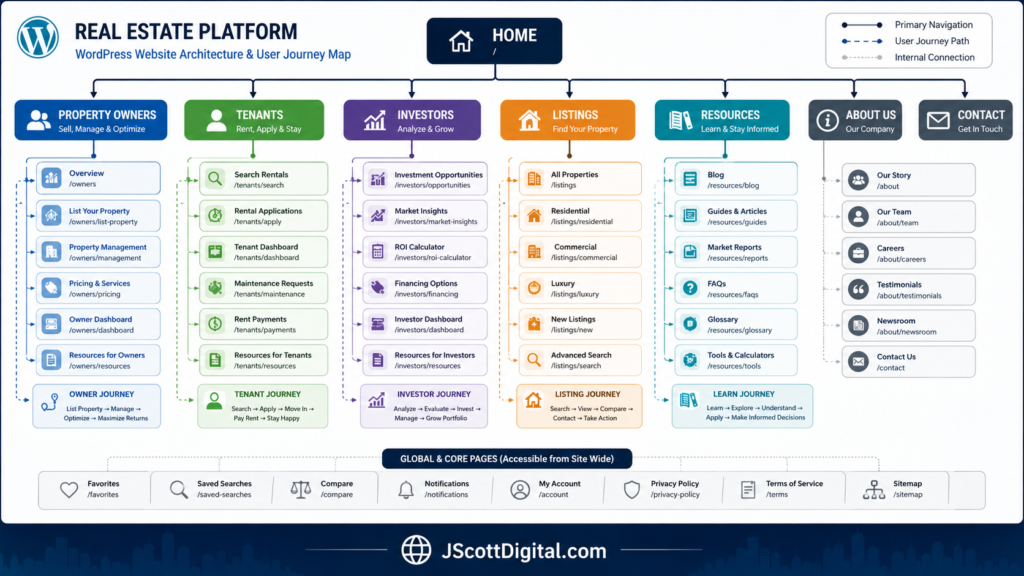
Build the Site Around Real Estate Customer Journeys
The existing Weebly navigation may provide a useful reference, but it should not automatically become the new WordPress menu.
Older sites frequently reflect the order in which pages were created rather than the way visitors look for information. A company may have added new markets, services, property types, articles, and portals over several years without reconsidering how the site fits together.
WordPress gives you an opportunity to create a clearer information architecture.
For a property management company, owner-acquisition content might include services, property types, markets served, operating processes, case studies, and a proposal request. Tenant content may focus on available rentals, qualification criteria, applications, payments, and maintenance.
These two audiences use the same company website but arrive with different objectives. Placing them in separate, clearly labeled pathways reduces confusion and helps each visitor reach the appropriate destination faster.
A real estate investment business may organize its site around investment approach, asset classes, markets, research, portfolio experience, and partnership inquiries. A commercial real estate company might emphasize services, property types, listings, professionals, research, and transactions.
The structure should follow the company’s actual business rather than a prebuilt theme demonstration.
Plan the path from information to action
Each important page should lead naturally to a relevant next step.
A property owner reading about management services might continue to a case study and then request an initial consultation. A prospective tenant viewing an available rental should be able to reach the correct application without searching through owner-focused content. An investor reading a market article might continue to an investment framework, related research, or an inquiry page.
This does not require placing an aggressive sales prompt in every section. It requires understanding what a qualified visitor is likely to need next.
Decide Where Property Information Will Be Managed
WordPress may become the primary website platform without becoming the source of every piece of property data.
Listings and availability may originate from property management software, an MLS connection, a commercial listing platform, a vacation-rental system, or a custom database. Some information may be embedded in the website, while other content may be entered directly into WordPress.
Determine which system will serve as the authoritative source before building property templates.
When rental availability already comes from property management software, manually recreating the same information in WordPress can produce inconsistent prices, dates, or availability. In that situation, the website may be better used as the marketing layer while the operational platform remains responsible for live inventory.
A commercial real estate company may use WordPress to publish detailed market and property-type content while displaying active listings through an external system. An investment firm may create selected asset or case-study pages in WordPress without publishing operational portfolio data.
For each connection, document how information reaches the current Weebly site and what the replacement will require. Review the account owner, provider, public URL, embed method, feed, API requirements, and mobile behavior.
Do not assume that a tool working in Weebly will function identically in WordPress. Confirm compatibility and test the proposed implementation before the launch date.
Choose the Right Method for Moving the Content
There is no single transfer method that works equally well for every Weebly site.
Weebly’s official backup instructions explain that a site archive can be downloaded as a ZIP file. However, blog and store pages are excluded because they depend on Weebly’s database, and elements such as forms and slideshows may not work outside the editor.
A real estate website migration may therefore use a combination of automated transfer, manual recreation, and editorial review.
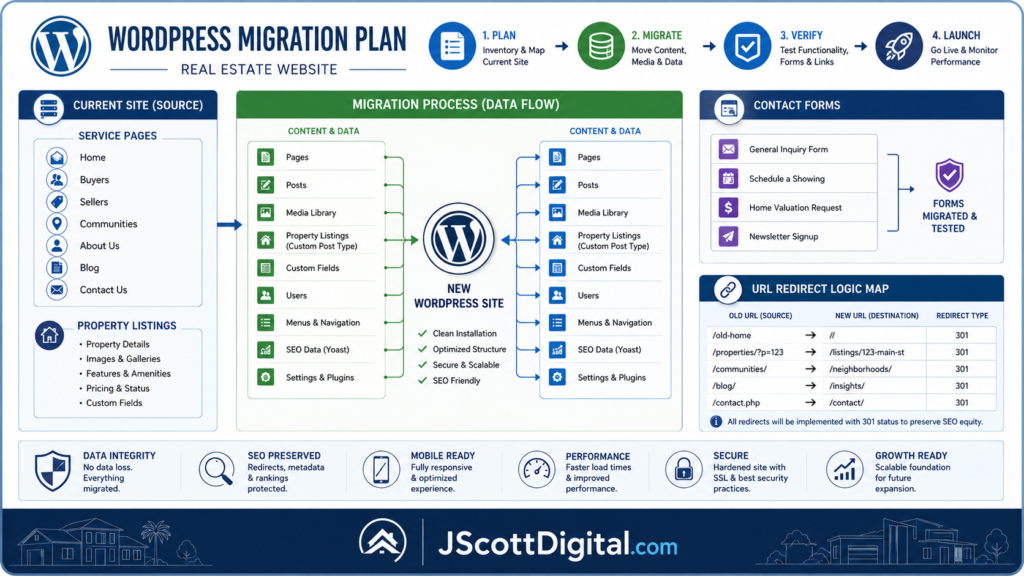
Straightforward informational pages may be recreated in approved WordPress templates. Blog posts may require a separate transfer process that preserves titles, text, images, authorship, categories, publication dates, and internal links. Forms must normally be rebuilt because their submission logic does not reside in the visible page content.
Complex pages may need to be reconstructed rather than imported. Examples include interactive property displays, embedded searches, calculators, maps, multi-step forms, and pages assembled from Weebly-specific design elements.
The migration plan should identify the method for each content type before production begins.
Transfer approved content into a consistent page system
WordPress templates should be established for recurring content types such as service pages, market pages, team biographies, case studies, articles, and property profiles.
This produces a more consistent user experience and makes future publishing easier. It also prevents the migration team from making a new layout decision every time a page is transferred.
Content quality assurance should be completed as each page is built. Review headings, paragraph formatting, images, ALT text, links, downloads, metadata, mobile presentation, and calls to action before marking the page complete.
Pages scheduled for significant rewriting can be handled as a coordinated editorial workstream. Separating major content development from routine transfer helps prevent the entire build from stalling while individual pages are debated.
Rebuild Forms as Business Systems
A form is successful only when the right inquiry reaches the right person or platform.
The visible fields are one part of the system. You also need to reproduce the submission destination, confirmation message, automated response, CRM connection, newsletter workflow, spam protection, privacy consent, and conversion tracking.
A property management proposal form may ask about location, property type, number of units, current occupancy, and the owner’s primary concern. That information can help qualify the inquiry before a consultation.
A tenant maintenance request, however, should usually remain inside the company’s operational management platform rather than a general website contact form. An investor inquiry may require different questions and disclosures than a property inquiry.
Rebuilding every form as a generic name-and-email box discards valuable context.
After the forms are configured, test the complete workflow. Confirm that the submission appears in the correct inbox or CRM, that the user receives the intended response, and that tracking records the conversion. Testing only the confirmation screen can miss delivery failures.
Use WordPress to Improve Publishing Control
One reason to move to WordPress is the ability to manage a substantial content library with greater control over templates, categories, metadata, internal links, and editorial workflows.
That flexibility is valuable for real estate businesses that publish market commentary, owner resources, investor education, property reports, or professional insights.
Before transferring a large article archive, define the new taxonomy. Categories should represent major recurring subjects rather than every narrow topic that has appeared once. Tags should improve navigation rather than duplicate categories or article titles.
Also determine how content will be reviewed and approved. A practical workflow may include drafting, subject-matter review, editing, compliance review where applicable, publication, and periodic updating.
WordPress provides the platform, but the publishing process determines whether the resource library remains accurate and useful.
Protect Valuable URLs and Search Visibility
A change of content management system does not require every public URL to change.
Where the existing Weebly URL is clear, relevant, and already receiving traffic or links, retaining it can reduce migration complexity. The new page can still receive a different design, revised content, and improved conversion elements.
When a URL must change, create a one-to-one redirect map before launch. The old address should lead to the closest relevant replacement rather than automatically sending every visitor to the homepage.
For example, an old property management service page should redirect to the corresponding new service. A consolidated market guide may receive redirects from several related but weaker location pages. An updated article should inherit the traffic from its earlier version.
Google’s guidance for site moves with URL changes recommends preparing and testing the replacement site, mapping old URLs to new destinations, using permanent server-side redirects, updating internal links, and monitoring performance after launch.
Search visibility may fluctuate during a migration, but avoidable disruption often comes from incomplete URL inventories, missing redirects, blocked pages, broken internal links, or lost metadata.
Before launch, verify that important pages have appropriate titles, headings, descriptions, canonical settings, internal links, and indexing instructions. The XML sitemap should contain the intended public URLs rather than staging pages, duplicates, or retired content.
Test the Site Through Real User Scenarios
Technical checks are necessary, but the final review should also reflect how people use a real estate website.
Ask someone unfamiliar with the build to complete several realistic tasks.
A prospective owner should be able to identify the management services, understand the company’s experience, and submit a proposal request. A prospective tenant should be able to find rentals and reach the correct application. An investor should be able to locate the company’s approach, supporting content, and inquiry path.
The same approach applies to connected systems. Open listings on desktop and mobile. Submit forms using real test addresses. Confirm that downloadable resources arrive correctly. Follow every owner and tenant portal link. Check map locations, phone links, scheduling tools, and newsletter subscriptions.
Test important old Weebly URLs as well. Each should open the corresponding WordPress page or redirect to a relevant destination.
This scenario-based review often reveals problems that a technical checklist misses. A page may function correctly while still sending the visitor through an unnecessarily confusing path.
Use a Phased Launch When the Deadline Is Tight
A migration does not need to solve every website and content issue before the first WordPress launch.
When time is limited, divide the project into continuity and improvement phases.
The first phase should preserve the domain, critical pages, lead forms, portals, essential integrations, valuable URLs, analytics, and legal content. It should result in a stable, professional website that can replace Weebly without interrupting the business.
The second phase can address larger content and publishing improvements. That may include rewriting service pages, consolidating articles, creating new market resources, developing case studies, refining conversion paths, and expanding the content library.
This approach is more controlled than rushing a complete strategic redesign or transferring every old page without review.
It also gives the company time to evaluate how users interact with the new structure before committing to additional development.
Monitor More Than Traffic After Launch
The migration is not complete when the domain begins loading the WordPress site.
During the first several weeks, monitor search performance, form delivery, CRM records, property displays, portal links, page errors, and user feedback. Compare high-value landing pages with their pre-migration performance and investigate unexpected declines.
Pay particular attention to functions that may fail silently. A form can stop delivering notifications while continuing to display a success message. An external property feed may stop updating without producing an obvious page error. A redirect may send visitors to the wrong service while still appearing technically valid.
Early monitoring allows these issues to be corrected before they affect a substantial number of prospects or clients.
Build a Real Estate Platform, Not a Weebly Replica
A successful Weebly to WordPress migration preserves the useful equity of the existing website while giving the business a better foundation for future publishing and lead generation.
That requires coordinated decisions about information architecture, property data, content transfer, forms, conversion paths, URLs, and editorial management.
The result should reflect how your real estate business operates today and how prospective clients evaluate it. WordPress is the platform used to deliver that experience; it is not the strategy by itself.
J. Scott Digital’s real estate website and digital publishing services combine WordPress planning, information architecture, content migration, and publishing support with real estate subject-matter experience.
Planning a move from Weebly? Start a project to define the website structure, content scope, integrations, redirect plan, and launch requirements for your real estate business.