When a WordPress Redesign Becomes a Content Problem
July 21, 2026
A real estate website redesign often begins with a visual complaint.
The site looks dated. The homepage feels cluttered. The mobile layout is awkward. Competitors appear more modern. Someone proposes a new WordPress theme, updated photography, sharper typography, and redesigned service pages.
Then the project begins, and the real problems surface.
Nobody knows which pages are still accurate. Several articles compete for the same topic. Important resources are buried beneath vague menu labels. Old landing pages continue receiving traffic even though the services have changed. Some content belongs to former business lines, while other pages no longer have a clear audience.
At that point, the project is no longer primarily about design.
A successful real estate website redesign requires you to decide what the website contains, how the information is organized, which pages deserve prominence, and what readers should do next. New colors and page templates cannot resolve those questions for you.
Design Usually Reveals Problems It Did Not Create
An outdated design may be obvious, but the content weaknesses underneath it often developed gradually.
Real estate websites tend to grow one page at a time. A new service receives a landing page. A market update becomes a blog series. Writers add articles without reviewing older posts. Categories multiply. Staff members create pages for short-term campaigns and never remove them.
After several years, the website may contain several overlapping structures:
The structure represented in the main menu
The structure created by categories and tags
The structure implied by internal links
The structure visitors actually use
The structure search engines have indexed
The structure the business now wants
A redesign forces these systems into view because every page must be moved, revised, removed, or assigned to a new template.
That is why the migration phase often takes longer than the visual build. You are not merely moving content into a new design. You are deciding whether the content still belongs there.
A New Homepage Cannot Repair an Unclear Purpose
Before selecting a theme or designing page layouts, you need to define what the website is intended to accomplish.
A brokerage, property management company, investment platform, lender, real estate publisher, and professional-services firm may all use WordPress, but their websites should not be organized in the same way.
Ask what the site must help your primary visitor do.
They may need to:
Evaluate a service provider
Understand an investment concept
Compare financing options
Research a property type
Find a calculator or template
Request a consultation
Subscribe to a report
Verify the organization’s expertise
Content design should begin with the reader’s needs rather than the organization’s preferred page list. The U.S. Web Design System’s design principles state that real user needs should guide product decisions and that assumptions should be tested with actual users. For a real estate redesign, that means identifying who your visitors are, which tasks they need to complete, where they encounter friction, and how the site’s content and navigation can support those tasks.
“This website helps commercial investors understand the firm’s expertise, review representative work, and begin a project discussion.”
That sentence becomes a test for every page. If a page does not support the site’s purpose, serve a defined audience, or complete an important reader journey, you need to question why it is being migrated.
Navigation Problems Usually Begin With Content Problems
A crowded navigation menu is rarely solved by moving items into larger dropdowns.
If your menu contains overlapping labels such as “Resources,” “Insights,” “Knowledge Center,” “Learning,” and “Blog,” the issue is not simply the number of links. The website may lack a coherent content model.
Visitors should be able to predict what they will find beneath a menu label. They should also be able to understand how broad topics relate to more specific resources.
Organize Around Reader Questions, Not Internal Departments
Your company may think in terms of sales, asset management, acquisitions, operations, and marketing. Your visitor may think in terms of buying a rental, financing a renovation, selecting a manager, reducing vacancy, or evaluating a market.
Navigation should reflect the reader’s mental model whenever possible.
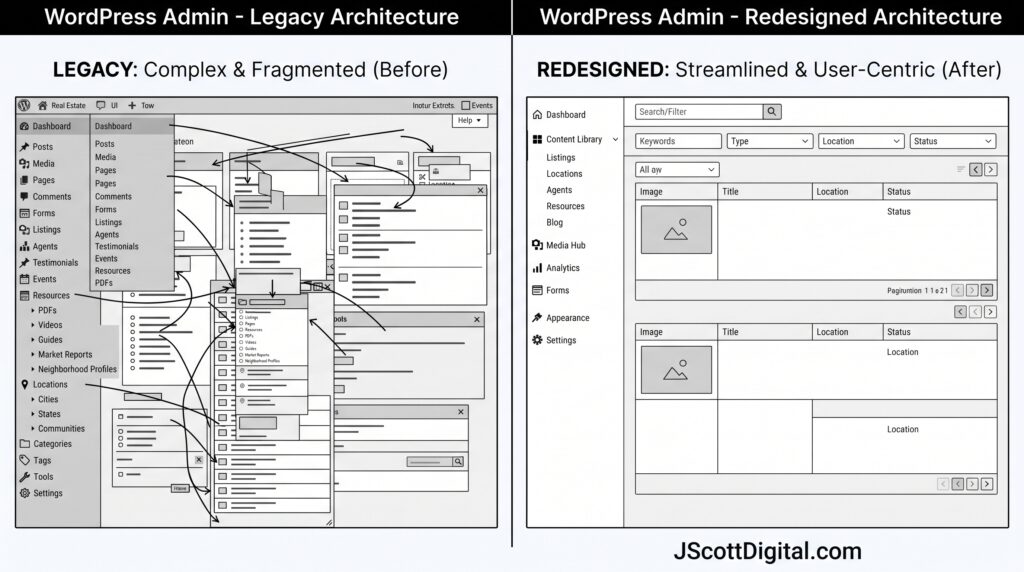
For a content-rich real estate site, you may need several levels:
Primary subjects: The major areas of expertise or service.
Resource types: Articles, calculators, reports, templates, books, or case studies.
Audience paths: Owners, investors, managers, lenders, or service providers.
Commercial actions: Start a project, request information, advertise, or subscribe.
The correct combination depends on the site. The important point is that these systems should not compete with one another.
WordPress uses categories, tags, and other taxonomies to group related content and make it easier for visitors to find. A redesign gives you an opportunity to determine whether those groupings still support navigation or have become an uncontrolled list of nearly identical archive pages.
The inventory should include more than standard pages and blog posts. Record:
Landing pages
Category and tag archives
Author pages
Reports and market updates
Glossary entries
Calculators and interactive tools
Downloadable files
Videos and embedded media
Forms
Thank-you pages
Policy and disclosure pages
Redirected and unpublished URLs
For each item, document its current URL, content type, audience, purpose, traffic, conversion role, publication date, and recommended action.
Give Every URL a Disposition
Every indexed or internally linked URL should receive a decision:
Keep: The page remains accurate and supports the new structure.
Refresh: The purpose is valid, but the information, presentation, or call to action needs updating.
Merge: Several pages address substantially the same question and should become one stronger resource.
Reposition: The content is useful but needs a different audience, keyword, title, or place in the hierarchy.
Retire: The page is obsolete, inaccurate, redundant, or unrelated to the current strategy.
Rebuild: The resource has value, but its format or functionality needs to change substantially.
This process prevents a common redesign failure: automatically importing every old page into a cleaner template and preserving the same weak library beneath a new interface.
It also aligns with a broader approach to real estate websites and digital publishing, where information architecture, content migration, resource libraries, and ongoing publishing control are treated as part of the website system rather than separate from design.
Migration Can Damage Valuable Content
Some redesigns introduce risk by changing URLs unnecessarily.
A developer may create a cleaner folder structure, remove dates from blog URLs, rename categories, consolidate post types, or rebuild pages under new slugs. These changes may be reasonable, but they need a deliberate migration plan.
Existing URLs may already have:
Search visibility
Backlinks
Referral traffic
Newsletter links
Bookmarks
Internal links
Advertising campaign history
Citations in third-party articles
Deleting or changing those addresses without proper handling can create broken links and make established resources difficult to find.
Build a URL Map Before Launch
Create a table containing:
Current URL
Proposed URL
Content action
Redirect destination
Canonical status
Internal links requiring updates
Responsible reviewer
Validation status
Avoid redirecting every removed page to the homepage. A redirect should lead to the most relevant replacement. When no appropriate replacement exists, removing the page may be more honest than sending the reader somewhere unrelated.
Google’s official site-move guidance recommends mapping old URLs to new locations, implementing permanent server-side redirects, updating internal links, and monitoring the site after the move. These tasks belong in the redesign plan, not in a cleanup list created after launch.
Templates Force You to Confront Content Inconsistency
A new design system depends on reusable page templates. That is usually beneficial until the existing content refuses to fit them.
One service page may contain 200 words and no evidence. Another may contain 2,000 words, three forms, testimonials, FAQs, and multiple calls to action. Article introductions may range from one sentence to several screens. Author information may appear on some pages but not others.
You then face a choice: distort the templates to accommodate every inconsistency or establish stronger editorial standards.
Define Page Requirements by Content Type
A service-page template might require:
A clear audience and problem
Scope of work
Relevant expertise
Process or methodology
Supporting proof
Frequently asked questions
One primary next action
An educational article might require:
A specific reader question
Named author or reviewer
Clear heading hierarchy
Relevant internal connections
Sources where needed
Publication and review dates
A logical next resource
Templates should not force every page to have identical length or structure. They should establish the information each page needs to perform its job.
Redesigns Often Expose a Governance Gap
The redesign team may repair the content library, but the same problems will return unless you change how content is managed after launch.
You need clear answers to questions such as:
Who can create a new category?
Who approves changes to navigation?
How are old market reports handled?
Who reviews technical real estate claims?
When should pages be consolidated?
Who maintains redirects?
How are author biographies updated?
Which pages require scheduled reviews?
Who owns calculators, forms, and downloadable resources?
Without governance, the new information architecture begins deteriorating almost immediately.
Treat Launch as the Beginning of Maintenance
Assign ownership by content type or subject area. Establish review dates. Limit uncontrolled category and tag creation. Document terminology and linking standards. Monitor broken links, abandoned pages, search queries, and internal navigation behavior.
You should also keep a decision log during the redesign. Record why categories were merged, URLs changed, pages retired, and navigation labels selected. That history helps future editors avoid recreating the problems the project just resolved.
A Redesign Readiness Test
Before committing to layouts and development, determine whether you can answer these questions:
Who is the primary audience?
What are the website’s most important user tasks?
Which content types exist?
Which pages generate meaningful traffic or conversions?
Which pages are inaccurate, duplicated, or obsolete?
What is the proposed topic hierarchy?
Which URLs will change?
Who approves content migration decisions?
What evidence must appear on key pages?
Who will maintain the site after launch?
When several answers are unknown, the project is not ready for visual design. It needs discovery, inventory, and content planning first.
Redesign the Publishing System, Not Just the Pages
A real estate website redesign succeeds when the new site becomes easier to understand, navigate, maintain, and expand.
Visual improvement matters. Clearer typography, stronger page hierarchy, mobile responsiveness, and consistent components all improve the reader’s experience. But those elements cannot compensate for an unfocused content library or an incoherent navigation system.
The redesign should help you decide what the website is for, which content deserves to remain, how topics relate, and how visitors move from a question to a useful answer.
When you solve those problems, the new WordPress design has a durable structure to support. When you avoid them, you may launch a more attractive website that preserves the same confusion in a different theme.